DeFi data for apps and dashboards: positions, TVL and yields
What is DeFi app data?
DeFi app data is what a protocol’s app and DeFi dashboard show its users: each wallet’s positions, TVL (total value locked), APY and yields, pool figures and the history of deposits, swaps and loans, read from the protocol’s contracts and served through the DeFi data API the app calls.
Lending markets, DEXs, yield vaults and perps exchanges depend on those numbers being right and current, because users decide where to deposit and whether to trust the protocol from them.
With Goldsky, you can run a subgraph of your contracts behind a hosted GraphQL API, or stream their events into your own database with Turbo Pipelines and serve your API from it, with Edge RPC for the latest-block reads in both.
Who uses DeFi app data?
DeFi lending protocols, DEXs, yield vaults and perps exchanges that show users their positions and the protocol’s numbers in their own app and dashboards.
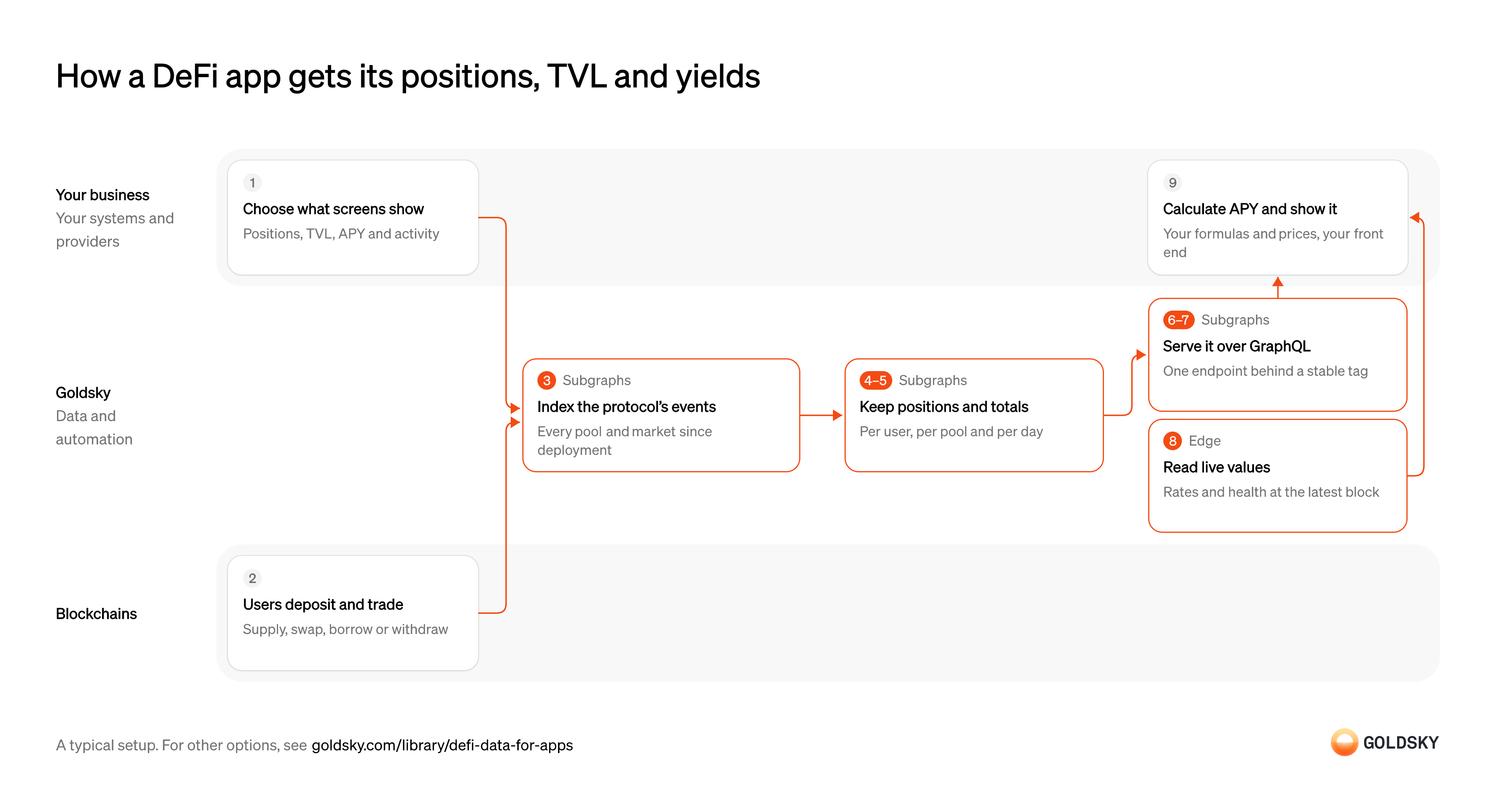
How a DeFi app gets its positions, TVL and yields
The diagram follows one user action, such as a deposit, from the chain to the position, totals and APY the app shows, and shows who does each step. Your setup may differ.
Ways to serve DeFi data to your app and dashboards
A subgraph keeps positions and totals in Goldsky’s index and serves them over GraphQL with no database to run; streaming puts every event in a database you own, where your API can join, window and rank the data any way a screen needs.
- Best for
- App teams that want a hosted GraphQL API and no database
- What you run
- Nothing; Goldsky runs indexing, storage and the API
- What you write
- A schema and mapping handlers, or a no-code or low-code config for simple contracts
- Where your data lives
- Hosted by Goldsky
- How results reach you
- You query; changes are pushed
- Best for
- Teams with a backend that want SQL over every event, joined with their own data
- What you run
- The destination: your database, queue or bucket, or a Postgres database Goldsky hosts
- What you write
- Pipeline YAML and SQL; TypeScript transforms when needed
- Where your data lives
- In your own database or systems
- How results reach you
- Pushed to you
| Usual setupOption 1: Protocol subgraph | Option 2: Stream to your database | |
|---|---|---|
| Best for | App teams that want a hosted GraphQL API and no database | Teams with a backend that want SQL over every event, joined with their own data |
| Products | SubgraphsEdge | TurboEdge |
| What you run | Nothing; Goldsky runs indexing, storage and the API | The destination: your database, queue or bucket, or a Postgres database Goldsky hosts |
| What you write | A schema and mapping handlers, or a no-code or low-code config for simple contracts | Pipeline YAML and SQL; TypeScript transforms when needed |
| Where your data lives | Hosted by Goldsky | In your own database or systems |
| How results reach you | You query; changes are pushed | Pushed to you |
Decide what each screen shows
The data you index follows from the numbers your app displays, so the list comes first.
List each figure per screen: a user’s supplied and borrowed amounts, a pool’s TVL and volume, a market’s rates, the activity list, and how fresh each one has to be. A figure nobody listed turns into an extra contract read on every page load.
Users supply, swap and borrow
Every number the app shows changes when someone uses the protocol.
Each deposit, swap, borrow, repayment, liquidation or withdrawal is a transaction that emits events from your contracts. Those events, together with values read from contract state, are the raw material for positions, totals and history.
Index every pool and market from deployment
Handled by Goldsky SubgraphsPositions and totals are built from every event since the contracts went live, so the index has to start there.
The index covers each contract, including pools or markets a factory creates later, from its deployment block. Starting at block zero wastes hours scanning blocks with nothing in them, and starting too late leaves positions missing their first deposits.
Deploy the subgraph to Goldsky from source code, by migrating it from another host, or as a no-code subgraph built from contract addresses and ABIs, and set each data source’s start block to the contract’s deployment block.
Deploy a subgraph (opens in a new tab)Keep each position and pool total current
Handled by Goldsky SubgraphsThe app reads a user’s position or a pool’s TVL in one query, so those figures are updated as each event lands rather than added up on request.
Each event updates the entities it touches: the user’s position, the pool’s reserves or the market’s totals. Values that live only in contract state, such as an exchange rate, are read during indexing, and reading them one by one slows indexing down.
Goldsky Subgraphs runs your mappings, which keep scalar running totals such as a pool’s TVL on mutable entities, while swaps and deposits are
Design a faster subgraph (opens in a new tab)immutable: trueentities. Declaredeth_calls in the manifest are fetched in parallel ahead of each block, so contract reads don’t hold up the handlers.Record history for charts and activity lists
Handled by Goldsky SubgraphsTVL and volume charts and a user’s activity list need history, not only the latest value.
Each event is kept as its own record linked to its user and pool, and hourly or daily totals are kept for charts. Storing a growing list on the pool or user record instead slows every update as the list grows.
In a Goldsky subgraph, mark each swap or deposit as a
Use timeseries and aggregations (opens in a new tab)timeseriesentity and declare an@aggregationwithhouranddayintervals, and the database computes the sums and counts; a@derivedFromfield lists a pool’s or user’s events without storing an array.Serve the front end over GraphQL
Handled by Goldsky SubgraphsThe app needs one endpoint it can query for exactly the fields each screen shows.
Decide whether the app calls the endpoint straight from the browser or through your backend, which can add caching and keep keys private. An endpoint key shipped in browser code is visible to anyone who opens the page.
Every Goldsky subgraph comes with a GraphQL endpoint, public by default and with an optional private endpoint that takes an
Use GraphQL endpoints (opens in a new tab)Authorization: Bearerheader with a project API token. Goldsky doesn’t enforce CORS on these endpoints, so a browser app can call them.Ship new versions without changing the app
Handled by Goldsky SubgraphsSchemas change as the protocol adds markets and features, and the app shouldn’t break while a new version syncs.
Deploy the new version beside the live one, wait until it has caught up with the chain, then switch the app to it. Pointing the app at a version that’s still syncing shows users incomplete positions.
A subgraph tag such as
Move a subgraph tag (opens in a new tab)prodis a stable endpoint that points at one deployment; runninggoldsky subgraph tag createon the new version moves it, with no change to your app’s code.Read values that change every block
Handled by Goldsky EdgeSome figures, such as a borrower’s health factor or a market’s current rate, move with every block and are cheaper to read than to index.
The app reads them from the contracts at the latest block when a screen opens, through an RPC endpoint close to your users. Reading every figure this way instead of from an index makes each page load slow and hits rate limits as traffic grows.
Goldsky’s Edge RPC runs
Learn about Edge RPC (opens in a new tab)eth_callagainst contract state atlatestor any block, with caching and request deduplication for front ends and failover across providers. It’s served over HTTPS only, so the app polls rather than subscribing.Calculate APY, TVL in dollars and other derived figures
Contracts store rates, indexes and token amounts, and users expect APY and dollar values.
Your team turns per-second or per-block rates into APY, multiplies token amounts by prices from a source you choose, and decides how rewards count toward yield. Documenting each formula beside the screen that uses it keeps the app and your docs from showing different numbers.
What to know about serving DeFi app data from a subgraph
- Totals are kept by your mapping code as events arrive, so a figure that needs data from many entities at query time is slow; keep it as a field instead.
- Queries return what the schema holds; joins with your offchain data happen in your app or backend.
- Public endpoints are open to anyone and rate limited; a private endpoint needs a project API token, which belongs on a server, not in the browser.
- A schema change means deploying a new version and letting it sync, then moving the tag your app queries.
Decide what each screen shows
The data you index follows from the numbers your app displays, so the list comes first.
List each figure per screen: a user’s supplied and borrowed amounts, a pool’s TVL and volume, a market’s rates, the activity list, and how fresh each one has to be. A figure nobody listed turns into an extra contract read on every page load.
Users supply, swap and borrow
Every number the app shows changes when someone uses the protocol.
Each deposit, swap, borrow, repayment, liquidation or withdrawal is a transaction that emits events from your contracts. Those events, together with values read from contract state, are the raw material for positions, totals and history.
Decode the protocol’s events into tables
Handled by Goldsky TurboContract events arrive as encoded bytes, and your tables need typed fields such as user, pool, amount and rate.
Every event the screens depend on is decoded with the contract’s ABI and loaded from the deployment block, so positions include their first deposit. Token amounts need full 256-bit precision, or large balances round.
A Turbo Pipelines SQL transform decodes your contracts’ logs with
Decode contract events (opens in a new tab)_gs_log_decode()and the ABI from_gs_fetch_abi(), and a source withstart_at: earliestand a filter on your contract addresses uses fast scan to load their history. The Postgres sink stores 256-bit integers without losing precision.Keep running totals per pool and per user
Handled by Goldsky TurboA pool’s TVL or a user’s net deposits shouldn’t be summed from every event on each page load.
Each deposit adds to a total and each withdrawal subtracts from it, keyed by pool, by user or by day. Lending positions grow with interest, so the stored figure is often a scaled balance your app multiplies by the market’s current index.
Goldsky’s
Keep running totals in Postgres (opens in a new tab)postgres_aggregatesink, which writes to a Postgres database, keeps a runningsum,countoravgper key in its own table, and when a reorg removes an event it takes that event back out of the total.Keep the tables in step with the chain
Handled by Goldsky TurboThe chain sometimes replaces its newest blocks, and a deposit in a dropped block never happened.
Rows from a replaced block have to be removed or updated, and a repeated delivery must overwrite the row it already wrote rather than add a second. Tables that only append show users positions the chain no longer backs.
Turbo Pipelines checks the block-hash chain as it ingests and sends deletes and updates through the pipeline after a reorg, and a Postgres sink with a
How reorgs reach your tables (opens in a new tab)primary_keyapplies them as upserts and deletes.Serve your API from the database
The front end calls an API shaped around its screens, and that API reads your tables.
Your API queries positions, totals and history, computes rolling figures such as 24-hour volume, and joins in offchain data such as reward programs. Indexes on user and pool columns keep the busiest screens fast.
Read values that change every block
Handled by Goldsky EdgeSome figures, such as a borrower’s health factor or a market’s current rate, move with every block and are cheaper to read than to index.
The app reads them from the contracts at the latest block when a screen opens, through an RPC endpoint close to your users. Reading every figure this way instead of from an index makes each page load slow and hits rate limits as traffic grows.
Goldsky’s Edge RPC runs
Learn about Edge RPC (opens in a new tab)eth_callagainst contract state atlatestor any block, with caching and request deduplication for front ends and failover across providers. It’s served over HTTPS only, so the app polls rather than subscribing.Calculate APY, TVL in dollars and other derived figures
Contracts store rates, indexes and token amounts, and users expect APY and dollar values.
Your team turns per-second or per-block rates into APY, multiplies token amounts by prices from a source you choose, and decides how rewards count toward yield. Documenting each formula beside the screen that uses it keeps the app and your docs from showing different numbers.
What to know about streaming DeFi app data into your own database
- You run the database and the API on top of it, and design the tables and indexes your screens read.
- Rolling windows such as 24-hour volume, rankings and joins are queries in your database, not pipeline steps.
- Tables keyed on a
primary_keytake repeats and reorg corrections as upserts and deletes. - Running sums suit events that are only ever added or removed; a figure that needs the old value to change, such as a position re-priced in place, is computed in your queries.
What you control
- Your team
- Decide what each screen shows
- Calculate APY, TVL in dollars and other derived figures
Questions and answers
What is a DeFi dashboard?
A DeFi dashboard is a screen that shows a protocol’s numbers, such as TVL, APY, volume and each user’s positions, read from its contracts. A protocol’s own dashboard usually reads from an index of its events, such as a subgraph or a database kept in sync with the chain, plus a few live reads for values that change every block.
What is a DeFi data API?
A DeFi data API is an endpoint an app calls for protocol data, such as pools, markets, positions and past activity, instead of reading the chain itself. A protocol can run its own, as a GraphQL API over a subgraph of its contracts or an API over a database a pipeline keeps current, so the fields match its screens.
Security and deployment
- SOC 2 Type IIIndependently audited security controls.
- Dedicated infrastructureSingle-tenant options for production workloads.
- Data residencyCloud, on-premises or co-located.
More use cases that track positions and PnL
- Prediction market positions and PnLCalculate holdings and profit and loss per account.
- Crypto trading data for bank and broker clientsTrack positions and PnL for clients who trade crypto through their bank or broker.
- Prediction market positions and PnLTrack each account’s prediction-market positions and PnL.
Use cases built the same way
- DAO delegate dashboards and voting power analyticsTrack voting power, delegators and votes per delegate for a token-governed DAO.
- Supply data for stablecoin issuance platformsGive an issuance platform one view of supply across every coin and chain it runs.
- NCUA stablecoin reporting dataReport supply, mint and burn, and holder figures for a stablecoin issued by a credit union subsidiary under the NCUA’s proposed rules.
- Onchain data for finance and BI reportingLoad onchain activity into the warehouse so finance and BI teams can report on it.
Serve DeFi data to your app and dashboards with Goldsky
We’ll map it to your systems and show you what Goldsky runs, so your team builds the product, not the pipelines underneath it.
 Robinhood
 HyperEVM
 Arc
 Solana
 Ethereum
 Polymarket
 Base
 Tempo
 Bitcoin