Prediction market positions and PnL
What are prediction market positions and PnL?
Prediction market positions and PnL are each trader’s holdings in every market outcome, with the average price they paid and the profit or loss on what they’ve sold.
Prediction markets, trading apps and analytics providers use them for portfolio screens, leaderboards and research, and every one depends on applying each fill in order.
Goldsky keeps positions current from every fill and serves them by wallet or streams them to your database, while unrealized PnL, rankings and what you show stay with you.
You can build it two ways: call the Feeds prediction-market positions API for each wallet, or stream the positions dataset into your own database with Turbo Pipelines.
Who tracks prediction market positions and PnL?
Prediction market apps, trading terminals and data and analytics providers that track traders on prediction markets.
How prediction market positions and PnL are tracked
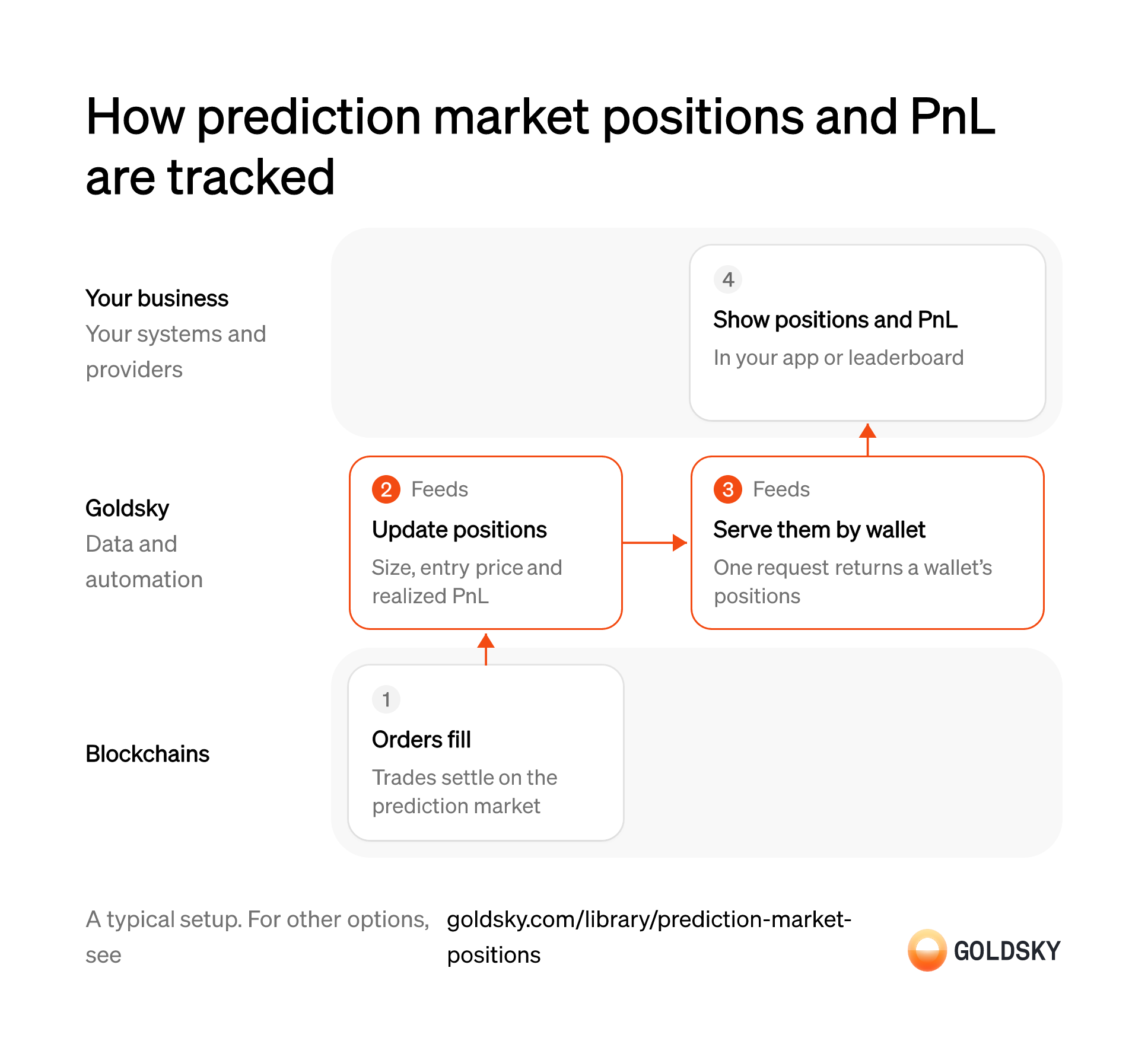
The diagram follows one wallet from its orders filling on the market to its positions and PnL in your app, and shows who does each step. Your setup may differ.
Ways to track prediction market positions and PnL
The positions API returns one wallet’s current positions and realized PnL per request; the pipeline puts every account’s positions in your database, where you can add unrealized PnL, history and rankings.
- Best for
- One wallet’s current positions, with no database
- Products
- Feeds
- What you run
- Nothing; you call an endpoint and keep what you need
- What you write
- REST requests
- Where your data lives
- Hosted by Goldsky
- How results reach you
- Returned when you call
- Best for
- Every account, with history and rankings in your database
- Products
- Turbo
- What you run
- The destination: your database, queue or bucket, or a Postgres database Goldsky hosts
- What you write
- Pipeline YAML and SQL; TypeScript transforms when needed
- Where your data lives
- In your own database or systems
- How results reach you
- Pushed to you
| Usual setupOption 1: Positions API | Option 2: Stream to your database | |
|---|---|---|
| Best for | One wallet’s current positions, with no database | Every account, with history and rankings in your database |
| Products | Feeds | Turbo |
| What you run | Nothing; you call an endpoint and keep what you need | The destination: your database, queue or bucket, or a Postgres database Goldsky hosts |
| What you write | REST requests | Pipeline YAML and SQL; TypeScript transforms when needed |
| Where your data lives | Hosted by Goldsky | In your own database or systems |
| How results reach you | Returned when you call | Pushed to you |
Fill orders on the prediction market
A trader’s position changes each time one of their orders to buy or sell outcome shares is filled.
Each fill is recorded onchain with the trader, the outcome token, the number of shares and the price. One trade can produce several fills, one for each side and each order it matched.
Keep each position current
Handled by Goldsky FeedsA position is the running result of every fill: how many shares the trader holds, what they paid on average and what they’ve made on what they sold.
Every fill for a wallet has to update its size, average entry price and realized PnL, in order. A fill missed or applied twice leaves the entry price wrong from then on.
Feeds keeps a position per wallet and outcome token for Polymarket, with
See the Polymarket datasets (opens in a new tab)amount,avg_price,realized_pnlandtotal_bought, updated as fills land on Polygon.Fetch a wallet’s positions
Handled by Goldsky FeedsYour app shows one trader’s positions when they open their portfolio or when someone looks them up.
One request returns the wallet’s positions, largest first or ranked by PnL. Amounts come back in raw units, so the app divides them before showing them, or a share count looks a million times larger.
With Goldsky, your app calls the Feeds Positions endpoint with the wallet
Read the positions endpoint reference (opens in a new tab)address, andsort=realized_pnl_descranks positions by PnL. Addinclude_zero=trueto include closed positions.Show positions and PnL in your app
Traders want their open positions and results on one screen, and leaderboards rank them by PnL.
Your app shows each position’s size, entry price and PnL. Gains on shares still held depend on each outcome’s current market price, which comes from your price source; showing only realized PnL undercounts traders with large open positions.
What to know about using a positions API
- Positions are current only; you can’t ask for a wallet’s positions at a past block.
- PnL is realized only, so gains on shares still held are yours to add.
- A position is the net of trades, which can differ from the tokens the wallet holds after splits, merges or plain transfers.
- A leaderboard across many wallets means one call per wallet.
Fill orders on the prediction market
A trader’s position changes each time one of their orders to buy or sell outcome shares is filled.
Each fill is recorded onchain with the trader, the outcome token, the number of shares and the price. One trade can produce several fills, one for each side and each order it matched.
Stream every account’s positions to your database
Handled by Goldsky TurboLeaderboards and risk views compare all traders at once, so every position has to be in one place.
Each position row is keyed by trader and outcome, so an update replaces the old row instead of adding a second one. Without that key, a trader’s position is counted once per trade.
A Turbo Pipelines pipeline can read the
See the Polymarket datasets (opens in a new tab)polymarket.user_positionsdataset, including its history, and write it to a database sink keyed onuser_idandtoken_id.Keep the fills for trade history
Handled by Goldsky TurboA position shows where a trader stands; the fills show how they got there.
Each fill is stored once, with its price, side and size. Trade history rebuilt from position snapshots loses the individual trades and their prices.
The same pipeline can add the
See the order-filled schema (opens in a new tab)polymarket.order_filleddataset as a second source and write each fill, keyed on itsid, to another table.Add unrealized PnL and rankings
Traders and leaderboards care about open positions too, valued at today’s odds.
Your database multiplies each open position by the outcome’s current price, adds realized PnL and ranks wallets. Rankings worked out from realized PnL alone favor traders who sell early.
Show positions and PnL in your app
Traders want their open positions and results on one screen, and leaderboards rank them by PnL.
Your app shows each position’s size, entry price and PnL. Gains on shares still held depend on each outcome’s current market price, which comes from your price source; showing only realized PnL undercounts traders with large open positions.
What to know about streaming prediction market positions
- The positions dataset covers every account, so the first load is large; plan storage for it.
- Rankings, totals and unrealized PnL are queries in your database.
- Tables keyed on a primary key take reorg corrections as updates and deletes.
- Goldsky runs the pipeline; you own the database and the queries on it.
What you control
- Your team
- Show positions and PnL in your app
Security and deployment
- SOC 2 Type IIIndependently audited security controls.
- Dedicated infrastructureSingle-tenant options for production workloads.
- Data residencyCloud, on-premises or co-located.
More use cases that track positions and PnL
- Prediction market positions and PnLCalculate holdings and profit and loss per account.
- Crypto trading data for bank and broker clientsTrack positions and PnL for clients who trade crypto through their bank or broker.
- DeFi data for apps and dashboards: positions, TVL and yieldsShow users their positions, the protocol’s TVL and yields, pool and market data and activity history in a DeFi app’s front end and dashboards.
Track prediction market positions and PnL with Goldsky
We’ll map it to your systems and show you what Goldsky runs, so your team builds the product, not the pipelines underneath it.
 Robinhood
 HyperEVM
 Arc
 Solana
 Ethereum
 Polymarket
 Base
 Tempo
 Bitcoin