Crypto trading data for bank and broker clients
What is crypto trading data for bank and broker clients?
Crypto trading data for bank and broker clients is the position and profit-and-loss (PnL) record a bank or broker keeps for each client who buys and sells crypto through them.
The firms run the trading through a crypto provider, but the client expects their crypto on the same screen and statement as everything else, with what it cost and what it’s worth.
Goldsky supplies each client wallet’s transfers with their dollar value at the time, while the cost-basis method, the PnL figures and the client statement stay with you.
You can build it two ways: pull each client’s transfers with dollar values from the Feeds transfers API, or stream every client wallet’s transfers into your database with Turbo Pipelines.
Who uses crypto trading data for bank and broker clients?
Retail banks, brokerages, wealth platforms and neobanks that let clients buy and sell crypto through a crypto provider.
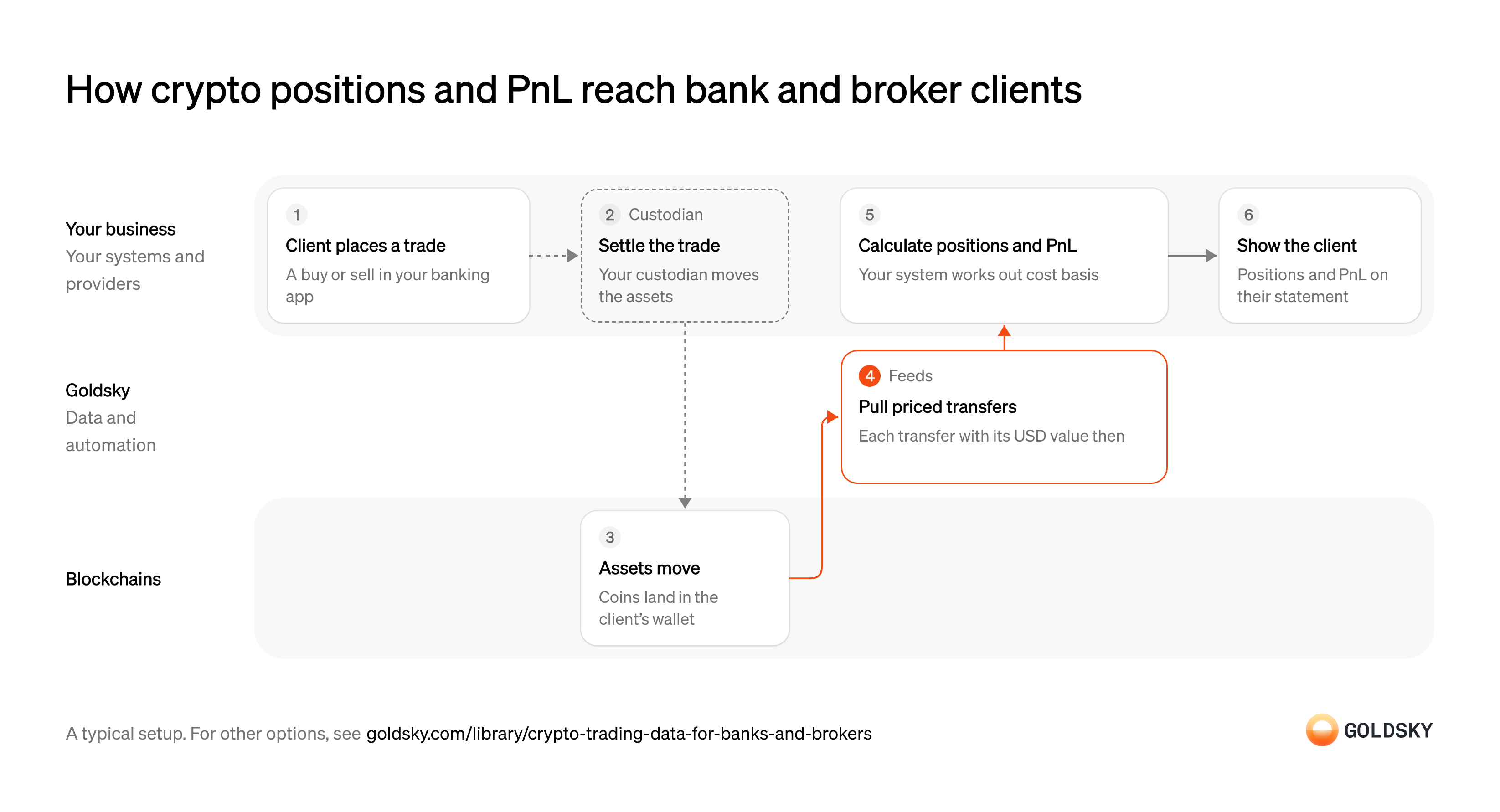
How crypto positions and PnL reach bank and broker clients
The diagram follows one trade from the client placing it to the position and PnL on their statement, and shows who does each step. Your setup may differ.
Ways to track crypto positions and PnL for clients
The transfers API returns one wallet’s transfers when you call it, while the pipeline keeps every client’s transfers in your database beside your books; either way, positions and PnL are yours to calculate.
- Best for
- An app team, positions built from API calls
- Products
- Feeds
- What you run
- Nothing; you call an endpoint and keep what you need
- What you write
- REST requests
- Where your data lives
- Hosted by Goldsky
- How results reach you
- Returned when you call
- Best for
- Every account, with position history in your database
- Products
- Turbo
- What you run
- The destination: your database, queue or bucket, or a Postgres database Goldsky hosts
- What you write
- Pipeline YAML and SQL; TypeScript transforms when needed
- Where your data lives
- In your own database or systems
- How results reach you
- Pushed to you
| Usual setupOption 1: Transfers API | Option 2: Stream to your database | |
|---|---|---|
| Best for | An app team, positions built from API calls | Every account, with position history in your database |
| Products | Feeds | Turbo |
| What you run | Nothing; you call an endpoint and keep what you need | The destination: your database, queue or bucket, or a Postgres database Goldsky hosts |
| What you write | REST requests | Pipeline YAML and SQL; TypeScript transforms when needed |
| Where your data lives | Hosted by Goldsky | In your own database or systems |
| How results reach you | Returned when you call | Pushed to you |
Take the client’s order
Clients buy and sell crypto inside the banking or brokerage app they already use.
Your app records the order against the client’s account, with the asset, the amount and the price agreed. That record is what the onchain movement is later checked against, so it needs your own order ID.
Settle the trade with your crypto provider
Most banks and brokers buy, sell and hold the coins through a crypto provider instead of running that themselves.
The provider executes the order and moves the coins under its custody arrangement with you. Keep its trade confirmation with your order ID, because it’s the only record of trades that don’t move coins on the chain.
Move the coins on the chain
A settled trade shows up onchain as a transfer when it changes what an address holds.
If your provider keeps a wallet for each client, the trade lands as a transfer into or out of that wallet. Providers that hold many clients in shared wallets record some trades only in their own books, so confirm with yours which setup you have before relying on the chain for positions.
Pull each client’s transfers with their value
Handled by Goldsky FeedsPositions and PnL are built from what moved into and out of each client wallet, and what it was worth then.
The lookup covers every transfer since you last checked, in both directions, with the dollar value at the time of each. Without that value, cost basis has to be filled in from another source, and the two rarely line up.
Goldsky’s Feeds Transfers endpoint returns a wallet’s native and ERC-20 transfers with
Read the transfers endpoint reference (opens in a new tab)price_usdandamount_usdat transfer time; passfromandtoto fetch only the window since your last run.Calculate positions and PnL
Clients want to see what they hold, what it cost them and how much they’ve made or lost.
Your system adds up each client’s quantity per asset and applies your cost-basis method, such as first in, first out, to work out realized PnL (profit or loss on what was sold). Book the dollar value of each trade when you record it, so a later price correction doesn’t change last month’s statement.
Show positions and PnL to the client
Clients check their crypto next to their other accounts, on the screen and on their statement.
Your app shows each position, its cost and its gain or loss, with current values from the price source you use elsewhere. Unrealized PnL (on what the client still holds) moves with the market, so the statement records the price and time it was taken at.
What to know about building positions from a transfers API
- Your system pulls, so positions are as fresh as the last call.
- Dollar values are worked out at request time, so book the value when you record each trade.
- Transfers come back without their own ID, and a transfer undone by a reorg stops appearing in responses.
- Position and PnL logic stay in your code.
Take the client’s order
Clients buy and sell crypto inside the banking or brokerage app they already use.
Your app records the order against the client’s account, with the asset, the amount and the price agreed. That record is what the onchain movement is later checked against, so it needs your own order ID.
Settle the trade with your crypto provider
Most banks and brokers buy, sell and hold the coins through a crypto provider instead of running that themselves.
The provider executes the order and moves the coins under its custody arrangement with you. Keep its trade confirmation with your order ID, because it’s the only record of trades that don’t move coins on the chain.
Watch every client wallet
Handled by Goldsky TurboYou only record trades for wallets you’re watching, so each new client wallet has to go on the list.
The list changes as clients open and close crypto accounts, and it has to update without a restart. A wallet missing from the list shows a client a position of zero.
With Goldsky, you can hold client addresses in a Turbo Pipelines dynamic table, which lives in a Postgres database, and add each new wallet as a row while the pipeline runs.
Learn about dynamic tables (opens in a new tab)Load each wallet’s past transfers
Handled by Goldsky TurboCost basis depends on every buy since the client started, so history has to be there before PnL is right.
Past transfers are loaded once, from each wallet’s first activity. A load that starts too late puts the wrong cost on everything the client still holds.
A Turbo Pipelines job (
Run a one-time backfill job (opens in a new tab)job: true) over a bounded block range writes the wallets’ past transfers to your database and exits when the range is done.Move the coins on the chain
A settled trade shows up onchain as a transfer when it changes what an address holds.
If your provider keeps a wallet for each client, the trade lands as a transfer into or out of that wallet. Providers that hold many clients in shared wallets record some trades only in their own books, so confirm with yours which setup you have before relying on the chain for positions.
Write every new transfer to your database
Handled by Goldsky TurboPositions update when a trade settles, so each transfer has to reach your tables as it happens.
Each transfer needs a stable ID so a repeated delivery doesn’t count twice, and rows undone by a reorg have to come out again. Without both, positions drift from what the client holds.
Turbo Pipelines writes each matching transfer to a database sink keyed on its
How reorgs reach your sinks (opens in a new tab)id, and passes reorg corrections through as deletes and updates to the same rows.Calculate positions and PnL
Clients want to see what they hold, what it cost them and how much they’ve made or lost.
Your system adds up each client’s quantity per asset and applies your cost-basis method, such as first in, first out, to work out realized PnL (profit or loss on what was sold). Book the dollar value of each trade when you record it, so a later price correction doesn’t change last month’s statement.
Show positions and PnL to the client
Clients check their crypto next to their other accounts, on the screen and on their statement.
Your app shows each position, its cost and its gain or loss, with current values from the price source you use elsewhere. Unrealized PnL (on what the client still holds) moves with the market, so the statement records the price and time it was taken at.
What to know about streaming client trades
- History is loaded once per wallet, then kept current without polling.
- Tables keyed on a primary key take reorg corrections as updates and deletes.
- Positions and PnL follow your cost-basis method, which takes each buy and sell in order, so they’re a query or job in your database.
- Goldsky runs the pipeline; you own the database and the PnL logic.
What you control
- Your team
- Take the client’s order
- Calculate positions and PnL
- Show positions and PnL to the client
- Your providers
- Custodian
Security and deployment
- SOC 2 Type IIIndependently audited security controls.
- Dedicated infrastructureSingle-tenant options for production workloads.
- Data residencyCloud, on-premises or co-located.
More use cases that track positions and PnL
- Prediction market positions and PnLCalculate holdings and profit and loss per account.
- Prediction market positions and PnLTrack each account’s prediction-market positions and PnL.
- DeFi data for apps and dashboards: positions, TVL and yieldsShow users their positions, the protocol’s TVL and yields, pool and market data and activity history in a DeFi app’s front end and dashboards.
Track crypto positions and PnL for clients with Goldsky
We’ll map it to your systems and show you what Goldsky runs, so your team builds the product, not the pipelines underneath it.
 Robinhood
 HyperEVM
 Arc
 Solana
 Ethereum
 Polymarket
 Base
 Tempo
 Bitcoin