Investor statements from a tokenized register
What it is
Investor statements from a tokenized register show each investor what they held at the end of a month or quarter and what it was worth, built from the token’s own transfer history.
Transfer agents, asset managers and private credit funds send them because investors and auditors expect a statement that matches the register on a fixed date.
Goldsky finds the last block of the period and gives you every transfer up to it; summing holdings, valuing them at the period NAV and sending statements stay with your team.
You can build investor statements two ways: copy every transfer up to the closing block into your warehouse with a one-time Turbo Pipelines job, or query a Goldsky subgraph for each holder’s balance at that block.
Who it’s for
Transfer agents, asset managers and private credit funds that report holdings to investors in a fund or note issued as a token.
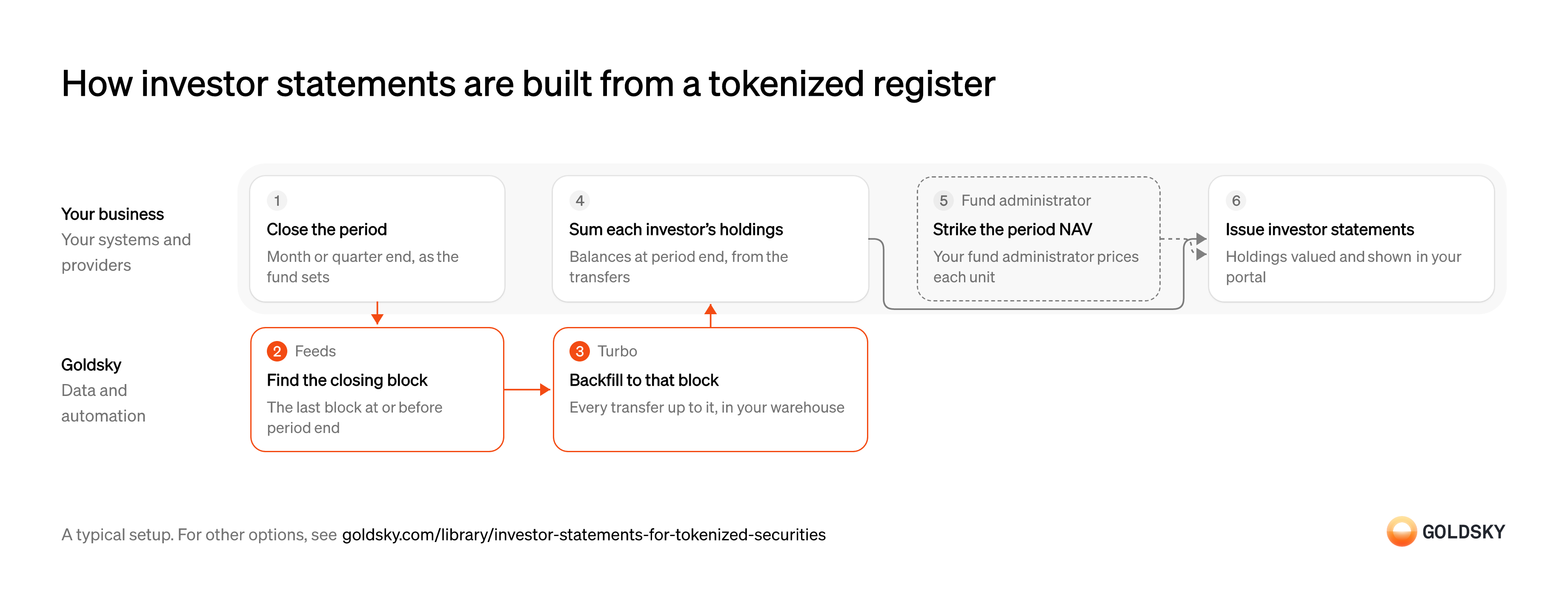
How investor statements are built from a tokenized register
The diagram follows one reporting period from its close to the statements in your investor portal, and shows who does each step. Your setup may differ.
Ways to produce investor statements from a tokenized register
The one-time job copies raw transfers into your warehouse for your team to add up, while the subgraph keeps every version of each holder’s balance and returns them at the closing block.
- Best for
- Statements built in your warehouse from the full history
- What you run
- The destination: your database, queue or bucket, or a Postgres database Goldsky hosts
- What you write
- Pipeline YAML and SQL; TypeScript transforms when needed
- Where your data lives
- In your own database or systems
- How results reach you
- Pushed to you
- Best for
- One chain per token, read at any past block from an API
- What you run
- Nothing; Goldsky runs indexing, storage and the API
- What you write
- A schema and mapping handlers, or a no-code or low-code config for simple contracts
- Where your data lives
- Hosted by Goldsky
- How results reach you
- You query; changes are pushed
| Usual setupOption 1: Backfill to your warehouse | Option 2: Query a hosted index | |
|---|---|---|
| Best for | Statements built in your warehouse from the full history | One chain per token, read at any past block from an API |
| Products | TurboFeeds | SubgraphsFeeds |
| What you run | The destination: your database, queue or bucket, or a Postgres database Goldsky hosts | Nothing; Goldsky runs indexing, storage and the API |
| What you write | Pipeline YAML and SQL; TypeScript transforms when needed | A schema and mapping handlers, or a no-code or low-code config for simple contracts |
| Where your data lives | In your own database or systems | Hosted by Goldsky |
| How results reach you | Pushed to you | You query; changes are pushed |
Close the reporting period
A statement shows holdings at one moment, so the fund fixes the date and time the period ends.
The cutoff is set by the fund’s documents, usually month or quarter end, with a time zone. A cutoff that shifts by an hour can move a transfer into the wrong period, and the statement won’t match the register.
Find the closing block
Handled by Goldsky FeedsThe chain counts time in blocks, so the period end has to become the number of the last block at or before it.
Each block carries a timestamp, and the closing block is the newest one at or before the cutoff. A block just after the cutoff pulls in transfers from the next period.
Feeds turns a time into a block: call its blocks endpoint with
Look up a block by time (opens in a new tab)timestamp_lteset to the cutoff,sort=number_descandlimit=1, and it returns the newest block at or before that time.Copy every transfer up to the closing block
Handled by Goldsky TurboHoldings at period end are the sum of every transfer up to that block, so the statement needs the token’s full history to that point.
The copy has to start at the token’s first block and stop at the closing block. One that stops early misses the last transfers of the period, and one that keeps running mixes in the next period.
Goldsky can run Turbo Pipelines as a one-time job with
Run a one-time backfill job (opens in a new tab)job: true: filter the source to the token’s address withblock_number <=the closing block, and the job exits once it has written that range, for example as Parquet files to S3.Sum each investor’s holdings
The statement shows units held at period end, so each investor’s transfers are added up to one balance.
Your warehouse sums the units received and sent by each wallet up to the closing block, then groups wallets by the investor they belong to. Count each transfer ID once, so a row written twice doesn’t double a holding.
Strike the period NAV
A statement shows what holdings are worth, so each unit needs the value the fund set for the period end.
Your fund administrator calculates the NAV per unit as of the same cutoff. A NAV from a different date values the holdings at the wrong price, even when the unit counts are right.
Issue investor statements
The statement is what the investor sees: their units at period end, the NAV and the value.
Each investor’s units are multiplied by the period NAV and published in your portal or sent by your usual channel. Keep the closing block and the source data with each statement, so an auditor can rebuild any figure.
What to know about backfilling transfers to your warehouse
- The job runs once per period and stops when it reaches the closing block, so nothing keeps running between statements.
- Your warehouse gets transfers, not balances; summing them per investor is a query your team owns.
- The job is bounded by a block filter on the source, which works on chains whose datasets support fast scan.
- Object storage sinks don’t remove duplicates, so your queries should count each transfer ID once.
Close the reporting period
A statement shows holdings at one moment, so the fund fixes the date and time the period ends.
The cutoff is set by the fund’s documents, usually month or quarter end, with a time zone. A cutoff that shifts by an hour can move a transfer into the wrong period, and the statement won’t match the register.
Find the closing block
Handled by Goldsky FeedsThe chain counts time in blocks, so the period end has to become the number of the last block at or before it.
Each block carries a timestamp, and the closing block is the newest one at or before the cutoff. A block just after the cutoff pulls in transfers from the next period.
Feeds turns a time into a block: call its blocks endpoint with
Look up a block by time (opens in a new tab)timestamp_lteset to the cutoff,sort=number_descandlimit=1, and it returns the newest block at or before that time.Keep the holder history in the index
Handled by Goldsky SubgraphsTo read balances as they stood at a past block, the index has to keep every earlier version of each holder’s balance.
Your mapping code keeps a balance per holder, and the index stores each change with the blocks it was valid for. If old versions are pruned to save space, balances before the pruned point can’t be read back.
Goldsky Subgraphs keeps historical record versions for time-travel queries at old blocks. Set
Choose how much history to keep (opens in a new tab)prune: neverin the subgraph so the full history stays available for every period.Read holdings at the closing block
Handled by Goldsky SubgraphsThe statement needs each holder’s balance as it stood at the end of the period, not today.
Your reporting job queries the index for every holder’s balance at the closing block number. Holder data isn’t public, so each request carries a key.
Subgraphs serves the index at a GraphQL endpoint, and a time-travel query returns records as they were at a given block. Turn on the private endpoint so each request needs an API token.
Query a private endpoint (opens in a new tab)Strike the period NAV
A statement shows what holdings are worth, so each unit needs the value the fund set for the period end.
Your fund administrator calculates the NAV per unit as of the same cutoff. A NAV from a different date values the holdings at the wrong price, even when the unit counts are right.
Issue investor statements
The statement is what the investor sees: their units at period end, the NAV and the value.
Each investor’s units are multiplied by the period NAV and published in your portal or sent by your usual channel. Keep the closing block and the source data with each statement, so an auditor can rebuild any figure.
What to know about statements from a hosted index
- The index returns balances for past blocks only if it keeps its full history, so its pruning setting has to keep it.
- Balances come back per wallet; grouping wallets by investor stays in your reporting job.
- Each index follows one chain, so a fund on several chains needs one per chain and your own step to combine them.
What you control
- Your team
- Close the reporting period
- Sum each investor’s holdings
- Issue investor statements
- Your providers
- Fund administrator
Security and deployment
- SOC 2 Type IIIndependently audited security controls.
- Dedicated infrastructureSingle-tenant options for production workloads.
- Data residencyCloud, on-premises or co-located.
More use cases that keep a holder register
- Onchain shareholder register for transfer agentsKeep a transfer agent’s official register of a tokenized fund or stock in step with onchain transfers.
- Tokenized fund register across chainsCombine holdings of one fund issued on many chains into a single register.
- Onchain primary issuance and allocationsRecord shares issued onchain at issuance or IPO straight into the register.
- Security token recovery for lost walletsRecord when an issuer reissues a lost security token to a new wallet after identity checks.
Produce investor statements from a tokenized register with Goldsky
We’ll map it to your systems and show you what Goldsky runs, so your team builds the product, not the pipelines underneath it.
 Robinhood
 HyperEVM
 Arc
 Solana
 Ethereum
 Polymarket
 Base
 Tempo
 Bitcoin