Cross-chain automation
What is cross-chain automation?
Cross-chain automation is taking an action on one blockchain when an event happens on another, such as releasing funds on the destination chain after a deposit or lock on the source; architects also call it cross-chain orchestration.
Chains and DeFi protocols with contracts on several chains run it because a user’s deposit or message starts on one chain and has to finish, exactly once, on another.
Goldsky Compose starts a task from the source-chain event, holds it until the block is deep enough and sends a signed call on the destination chain; the contracts, the confirmation rules and the reconciliation of both sides stay with you.
You can automate cross-chain actions two ways: a Compose task that acts on each source event while Turbo Pipelines records both chains in your database, or the same task on its own.
Who uses cross-chain automation?
Chains, bridges and DeFi protocols with contracts on several chains that move deposits or messages between them.
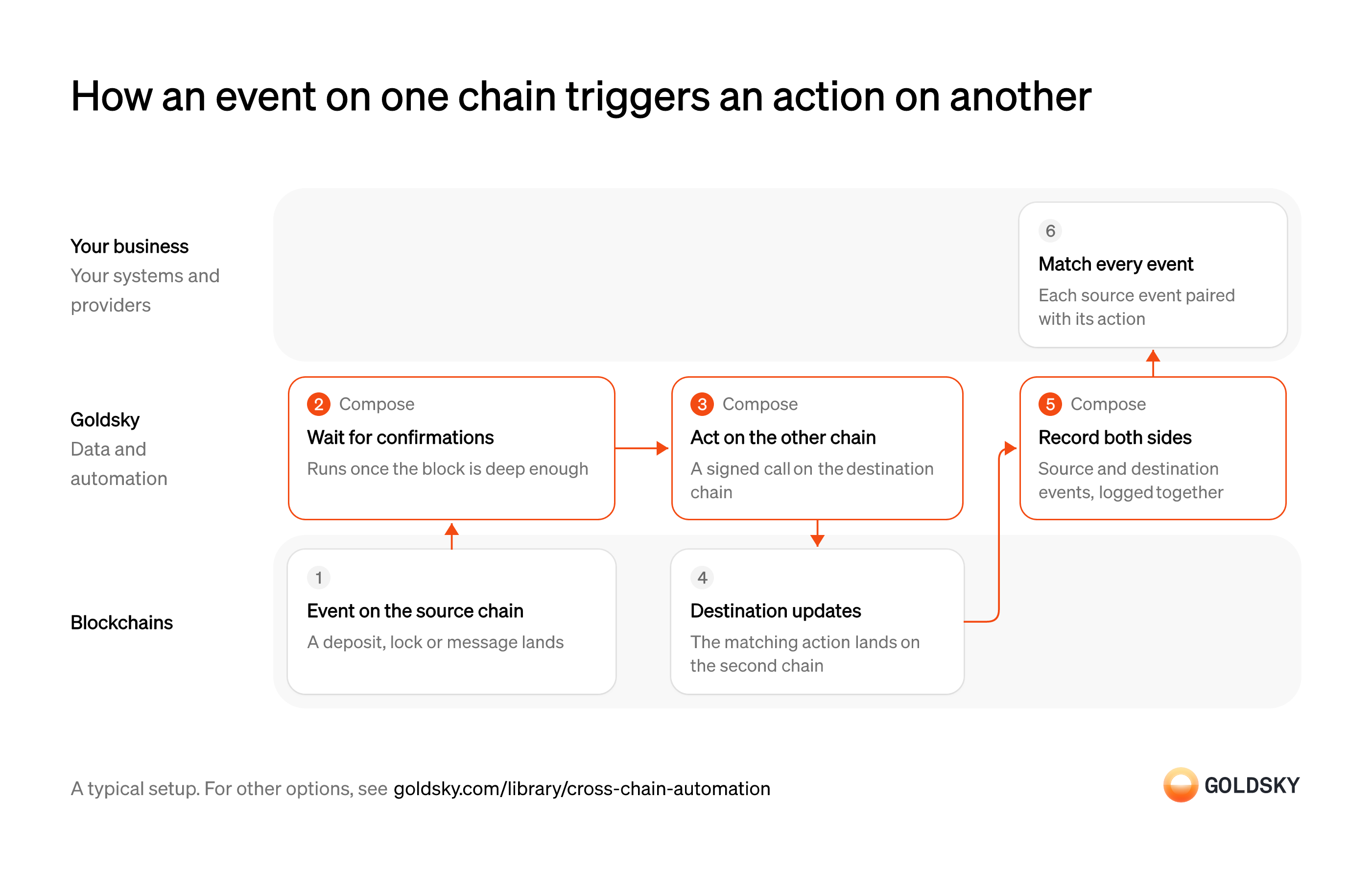
How an event on one chain triggers an action on another
The diagram follows one event from the source chain to the matching action on the destination chain, and shows who does each step. Your setup may differ.
Ways to automate cross-chain actions
Adding the pipeline puts both chains’ events in your database, so matching each source event to its action is a query; on its own, the task’s run history is the only record.
- Best for
- Moving value, with every source matched to its action
- Best for
- One event, one action, on EVM chains
- Products
- Compose
| Usual setupOption 1: Task plus two-chain record | Option 2: Event-triggered task | |
|---|---|---|
| Best for | Moving value, with every source matched to its action | One event, one action, on EVM chains |
| Products | ComposeTurbo | Compose |
Receive the event on the source chain
The job starts when a user deposits, locks tokens or sends a message on the first chain.
The event sits in a block that can still be replaced for a short time. Acting on it straight away risks releasing funds for a deposit that later disappears.
Wait until the source event is final enough
Handled by Goldsky ComposeA reorg, when the chain replaces its newest blocks, can undo a source event, so the action waits until undoing it is unlikely.
Pick a confirmation depth for each source chain, deeper where more value is at stake. Too shallow and a reorg can undo the source after you’ve acted; too deep and users wait longer than they need to.
Goldsky Compose holds each event from an
Hold events for confirmations (opens in a new tab)onchain_eventtrigger until its block is as manyconfirmationsdeep as you set, which needsparallel_processing: trueon the trigger. If a reorg removes the event while it waits, the task never runs for it.Act on the destination chain
Handled by Goldsky ComposeThe second half of the job is a signed call on the other chain, such as releasing or minting the matching amount.
The call has to happen once per source event. A retry after a timeout that sends a second release pays the user twice.
The task sends the call with
How durable execution works (opens in a new tab)writeContract. If the task restarts, a write that already finished returns its saved result instead of being sent again.Complete the move on the destination chain
Once the call is final, the user’s funds or message have arrived where they were going.
The destination contract records the action and usually emits its own event. Until that block is final, the move isn’t finished.
Record both chains’ events
Handled by Goldsky ComposeTo show every source event got its action, you need both sides in one place.
Source and destination events have to land in one database with the identifier that ties them together, such as a deposit ID or message hash. If the contracts don’t carry a shared identifier, matching falls back on amounts and timing, which breaks on identical transfers.
With Goldsky, the task’s trigger can be a full Turbo Pipelines definition with a
Feed a task and a database (opens in a new tab)postgressink beside itscompose_tasksink, so the events that start the task also land in your database. A second pipeline writes the destination chain’s events.Match every source event to its action
A source event with no destination action, or with two, is money owed or overpaid.
Your query pairs each source event with its destination action and flags the rest. Breaks need an owner and a deadline, or they pile up until a user reports one.
What to know about recording both chains
- The task acts and the database records; matching source to destination is a query you own.
- Source events wait until their block is as deep as you set, which trades speed for protection against reorgs.
- Tables keyed on a primary key follow reorgs, so the record stays in line with each chain.
- There are two pieces to run, and in return a missing or doubled action shows up as a break in a query.
Receive the event on the source chain
The job starts when a user deposits, locks tokens or sends a message on the first chain.
The event sits in a block that can still be replaced for a short time. Acting on it straight away risks releasing funds for a deposit that later disappears.
Wait until the source event is final enough
Handled by Goldsky ComposeA reorg, when the chain replaces its newest blocks, can undo a source event, so the action waits until undoing it is unlikely.
Pick a confirmation depth for each source chain, deeper where more value is at stake. Too shallow and a reorg can undo the source after you’ve acted; too deep and users wait longer than they need to.
Goldsky Compose holds each event from an
Hold events for confirmations (opens in a new tab)onchain_eventtrigger until its block is as manyconfirmationsdeep as you set, which needsparallel_processing: trueon the trigger. If a reorg removes the event while it waits, the task never runs for it.Remember which events you’ve handled
Handled by Goldsky ComposeThe same source event can reach the task again, and it must not cause a second action.
Keep a record of each source event the task has acted on, keyed on something unique to it, such as its transaction hash and log index. Without it, a repeat delivery sends a second release.
A collection keyed on the source event’s transaction hash and log index lets the task check for an earlier run before acting.
Keep state in collections (opens in a new tab)Act on the destination chain
Handled by Goldsky ComposeThe second half of the job is a signed call on the other chain, such as releasing or minting the matching amount.
The call has to land once and stay landed. A call the destination chain drops in a reorg leaves the user’s funds stuck halfway.
Goldsky Compose sends the call with
Handle confirmations and reorgs (opens in a new tab)writeContract, waits for the confirmations you set and replays it if a reorg on the destination chain removes it.Complete the move on the destination chain
Once the call is final, the user’s funds or message have arrived where they were going.
The destination contract records the action and usually emits its own event. Until that block is final, the move isn’t finished.
Review what each run did
Handled by Goldsky ComposeWhen a user asks where their funds are, the answer has to come from a record.
Each destination transaction should trace back to the run and the source event that caused it. If it doesn’t, support has to piece a move together from two block explorers.
Every call a Compose task makes is logged with its inputs and results, so each destination transaction leads back to the run and the event behind it.
How Compose logs each call (opens in a new tab)
What to know about using a task on its own
- There’s one piece to run: the trigger, the wait and the call all live in the task.
- The record of each move is the task’s run log and any state it keeps in a collection, not a table in your own database.
- A trigger set on a contract address watches one contract, on an EVM chain that task triggers support.
- Showing that every source event got exactly one action means working from the run history.
What you control
- Your team
- Match every source event to its action
Security and deployment
- SOC 2 Type IIIndependently audited security controls.
- Dedicated infrastructureSingle-tenant options for production workloads.
- Data residencyCloud, on-premises or co-located.
More use cases that run protocol automation
- Run your own oracle price feedPush prices and other data to contracts on many chains.
- Smart contract automation and keepersRun recurring or event-driven contract calls a protocol needs to keep working.
- Onchain circuit breakersPause a token, market or payout when a rule is breached.
- Onchain interest rate, funding rate and volatility feedsPublish interest rates, funding rates and volatility benchmarks to contracts.
- VRF and verifiable randomness for smart contractsDeliver signed random values to contracts for prize draws, lottery allocations and random selection, checkable by anyone.
Use cases built the same way
- Stablecoin remittancesSend money across borders in stablecoins and confirm it reached the recipient’s wallet or card.
- B2B cross-border payments in stablecoinsPay suppliers abroad in stablecoins and track each payment from send to off-ramp.
- Authorize and capture stablecoin paymentsHold a buyer’s stablecoins in an escrow contract at checkout, capture them to the merchant as orders ship, void what can’t be filled and refund after capture.
- Stablecoin payroll and contractor payoutsPay contractors and staff in stablecoins and confirm each payout settled.
Automate cross-chain actions with Goldsky
We’ll map it to your systems and show you what Goldsky runs, so your team builds the product, not the pipelines underneath it.
 Robinhood
 HyperEVM
 Arc
 Solana
 Ethereum
 Polymarket
 Base
 Tempo
 Bitcoin