Prediction market data
What is prediction market data?
Prediction market data is the history of trades, positions, prices and open interest from onchain prediction markets, packaged as datasets or an API; buyers also call it prediction market analytics or historical data.
Data providers and exchanges sell it to funds and trading firms that want crowd-set probabilities beside their other market data, so every fill has to be there, with history back to each market’s first trade.
Goldsky’s Turbo Pipelines decode fills and positions and load them into your warehouse, history and live; the per-market figures, the API and the client terms stay with you.
You can build a prediction market dataset two ways: run a Turbo Pipelines pipeline that decodes trades into your warehouse, or have Feeds sync its ready-made prediction market data into your database.
Who uses prediction market data?
Market data vendors, analytics firms and exchanges that resell prediction market activity to funds and trading desks.
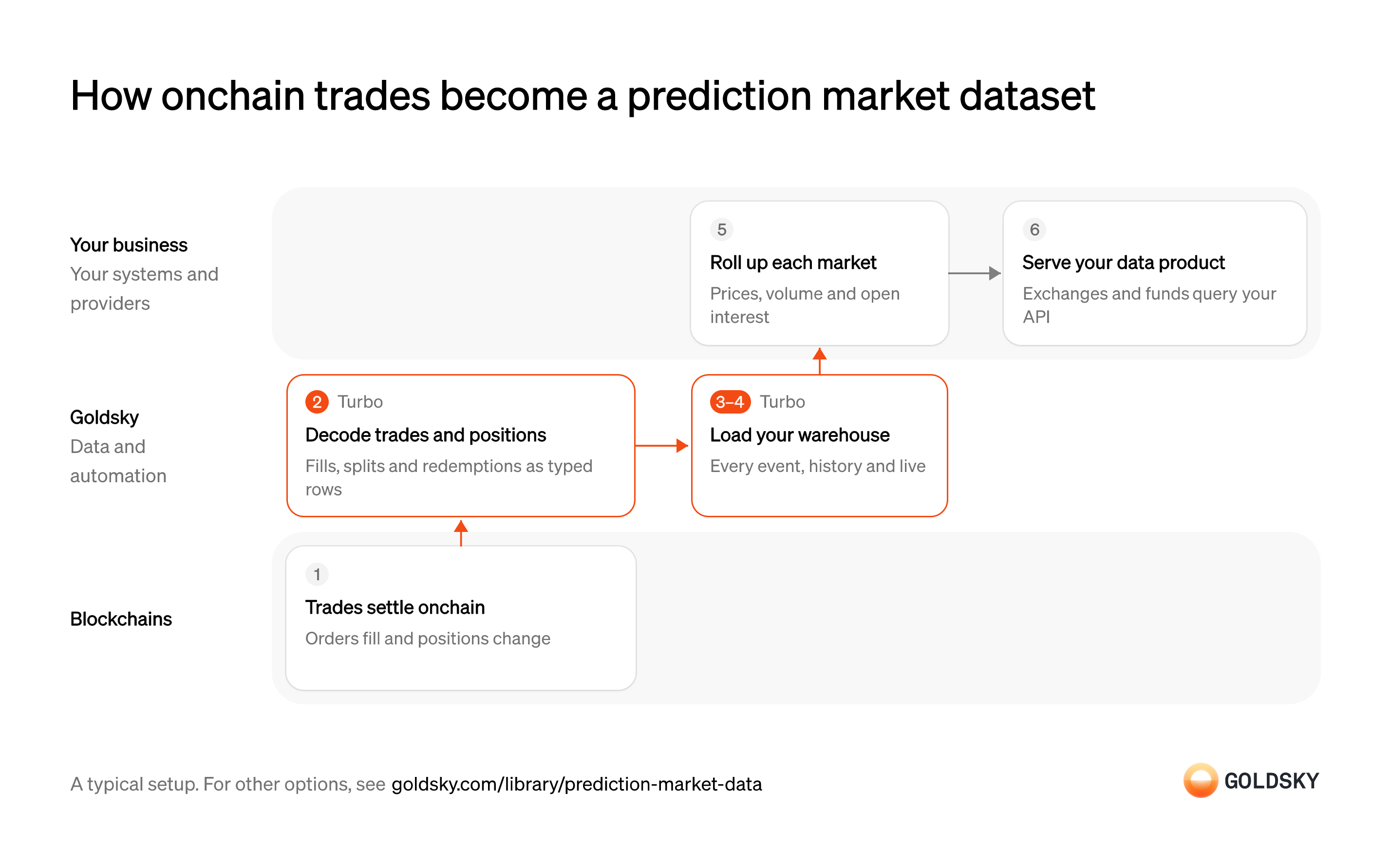
How onchain trades become a prediction market dataset
The diagram follows trades from settlement onchain to the data product your clients query, and shows who does each step. Your setup may differ.
Ways to build a prediction market dataset
Your pipeline lands the events, columns and history you choose in your warehouse; the synced feed arrives in Feeds’ fixed schema, with positions and realized profit and loss already worked out.
- Best for
- Full trade history in your own warehouse, shaped your way
- Products
- Turbo
- What you run
- The destination: your database, queue or bucket, or a Postgres database Goldsky hosts
- What you write
- Pipeline YAML and SQL; TypeScript transforms when needed
- Best for
- Ready-made fills and positions, with no pipeline to define
- Products
- Feeds
- What you run
- The destination database or endpoint
- What you write
- Nothing to get the rows; your own SQL to use them
| Usual setupOption 1: Stream to your warehouse | Option 2: Synced prediction market feed | |
|---|---|---|
| Best for | Full trade history in your own warehouse, shaped your way | Ready-made fills and positions, with no pipeline to define |
| Products | Turbo | Feeds |
| What you run | The destination: your database, queue or bucket, or a Postgres database Goldsky hosts | The destination database or endpoint |
| What you write | Pipeline YAML and SQL; TypeScript transforms when needed | Nothing to get the rows; your own SQL to use them |
Settle trades onchain
Every trade on an onchain prediction market is a transaction, so the chain holds the full record of the market.
Each fill, split or redemption is an event emitted by the market’s contracts. The newest blocks can still be replaced for a short time, so a trade seen once isn’t final yet.
Decode trades and positions
Handled by Goldsky TurboRaw chain events are encoded, so they have to become rows with named fields before anyone can analyze them.
Each fill needs its market, outcome, side, price, size, fee and both parties. A decoder that drops a field, or mixes up the maker’s side with the taker’s, skews every figure built on top.
Ready-made Polymarket datasets, including order fills and user positions, can be read directly as a Turbo Pipelines source. For other markets, a SQL transform decodes contract events with
Index Polymarket data (opens in a new tab)_gs_log_decode.Load the full history
Handled by Goldsky TurboClients buying the data expect history back to each market’s first trade, including everything before you started collecting.
The backfill has to hand over to live data with no gap and no double count where the two meet. Running history and live data as separate systems makes that seam your problem.
A Turbo Pipelines source can start at the earliest block and keep streaming once it catches up. A bounded backfill can also run on its own as a one-time job with
Run a one-time backfill job (opens in a new tab)job: true.Keep the warehouse current
Handled by Goldsky TurboClients on a live feed want new trades as they settle.
Rows are delivered at least once, so the same trade can arrive twice after a restart, and trades from replaced blocks have to come out again. A table without a unique key collects duplicates that inflate volume.
With Goldsky, the ClickHouse sink creates a
Write to ClickHouse (opens in a new tab)ReplacingMergeTreetable keyed on yourprimary_key, so repeated rows collapse and reorg deletes are marked on the rows they affect.Roll up each market
Clients want prices, volume and open interest per market and per period, not a list of individual fills.
Your warehouse queries turn fills into last price, volume and open interest for each market and time bucket. If a rollup has read rows that a reorg (the chain replacing its newest blocks) later deleted, its figures drift from the chain until it runs again.
Serve your data product
Funds and exchanges take the data through an API, files or their own data platform.
Your delivery layer decides what each client sees and how fresh it is. Say which block each response is current to, so a client can tell stale data from a quiet market.
What to know about streaming prediction market data
- Goldsky runs the pipeline; you own the warehouse, the rollups and the API your clients call.
- The pipeline’s SQL picks the events and columns, so the dataset’s schema is yours.
- The rows land in your warehouse, so prices, volume and open interest per market are queries your team runs there.
- When the chain replaces recent blocks, corrections arrive as updates and deletes; tables keyed on a primary key apply them, and file or queue destinations need your code to.
Settle trades onchain
Every trade on an onchain prediction market is a transaction, so the chain holds the full record of the market.
Each fill, split or redemption is an event emitted by the market’s contracts. The newest blocks can still be replaced for a short time, so a trade seen once isn’t final yet.
Sync fills and positions into your database
Handled by Goldsky FeedsYour product needs the market’s activity in your own tables, current and complete.
Each new fill and position change has to reach your database with its market, wallet, price and size, and keep arriving while your product runs. A sync that stops quietly leaves clients reading stale figures.
With Goldsky, you can have Feeds sync a feed to a database or webhook you own, so new rows land as they’re produced and nothing in your stack polls the API.
Sync Feeds to your database (opens in a new tab)Confirm what you can resell
Selling data to clients needs the right to redistribute it.
Check that your agreement covers passing the synced rows on to paying clients before they reach a product. Without that, the product rests on data you may not be allowed to sell.
Roll up each market
Clients want prices, volume and open interest per market and per period, not a list of individual fills.
Your warehouse queries turn fills into last price, volume and open interest for each market and time bucket. If a rollup has read rows that a reorg (the chain replacing its newest blocks) later deleted, its figures drift from the chain until it runs again.
Serve your data product
Funds and exchanges take the data through an API, files or their own data platform.
Your delivery layer decides what each client sees and how fresh it is. Say which block each response is current to, so a client can tell stale data from a quiet market.
What to know about syncing a prediction market feed
- Rows arrive in the Feeds schema, so your product is built on Feeds’ columns as they are.
- Positions come with average entry price and realized profit and loss, so you don’t calculate them from fills.
- Goldsky runs the sync; you own the destination and keep it reachable.
- Whether you can sell the synced data on is a question for your agreement, settled before it reaches a client product.
What you control
- Your team
- Roll up each market
- Serve your data product
Security and deployment
- SOC 2 Type IIIndependently audited security controls.
- Dedicated infrastructureSingle-tenant options for production workloads.
- Data residencyCloud, on-premises or co-located.
More use cases that distribute market data
- Prediction market dataPackage onchain trades, prices and flows into data products for exchanges, vendors and funds.
- 24/7 tokenized stock prices and flowsStream round-the-clock prices, transfers and flows for tokenized stocks.
- Trading rewards and builder fee attributionCredit fills, fees and incentive rewards to the app, builder or trader that drove them.
- Perpetuals and DEX market dataStream onchain perp and DEX trades, funding rates and candles to trading and research systems.
Use cases built the same way
- Supply data for stablecoin issuance platformsGive an issuance platform one view of supply across every coin and chain it runs.
- DAO delegate dashboards and voting power analyticsTrack voting power, delegators and votes per delegate for a token-governed DAO.
- Daily stablecoin supply by chain for PS-01 reportsKeep the daily per-chain supply, issued, redeemed, issuer-held, frozen and lost figures that feed the weekly OCC PS-01 report.
- GENIUS Act stablecoin reporting dataFile the weekly OCC PS-01 report from daily per-chain supply, freeze and holder data.
Build a prediction market dataset with Goldsky
We’ll map it to your systems and show you what Goldsky runs, so your team builds the product, not the pipelines underneath it.
 Robinhood
 HyperEVM
 Arc
 Solana
 Ethereum
 Polymarket
 Base
 Tempo
 Bitcoin