Digital asset treasury company holdings and mNAV
What are digital asset treasury company holdings and mNAV?
Digital asset treasury company holdings and mNAV are the figures investors use to judge a listed company that holds crypto as its main asset, often called a DAT: what it holds, how much each share is backed by, and its mNAV, the company’s market value divided by the value of its crypto.
Trackers, research firms and the treasury companies themselves publish these figures, mostly from filings and press releases, with the wallets a company discloses as another source.
Goldsky watches the wallets you list for each company and lands every transfer in and out, with its history, in your warehouse; the wallet list, share counts, prices and the mNAV calculation stay with your team.
You can track treasury holdings two ways: stream every transfer in and out of the wallets into your warehouse with Turbo Pipelines, or call Feeds for each wallet’s current balances with USD values.
Who tracks digital asset treasury company holdings and mNAV?
Crypto data and research firms that track treasury companies, and the treasury companies’ own finance and investor relations teams.
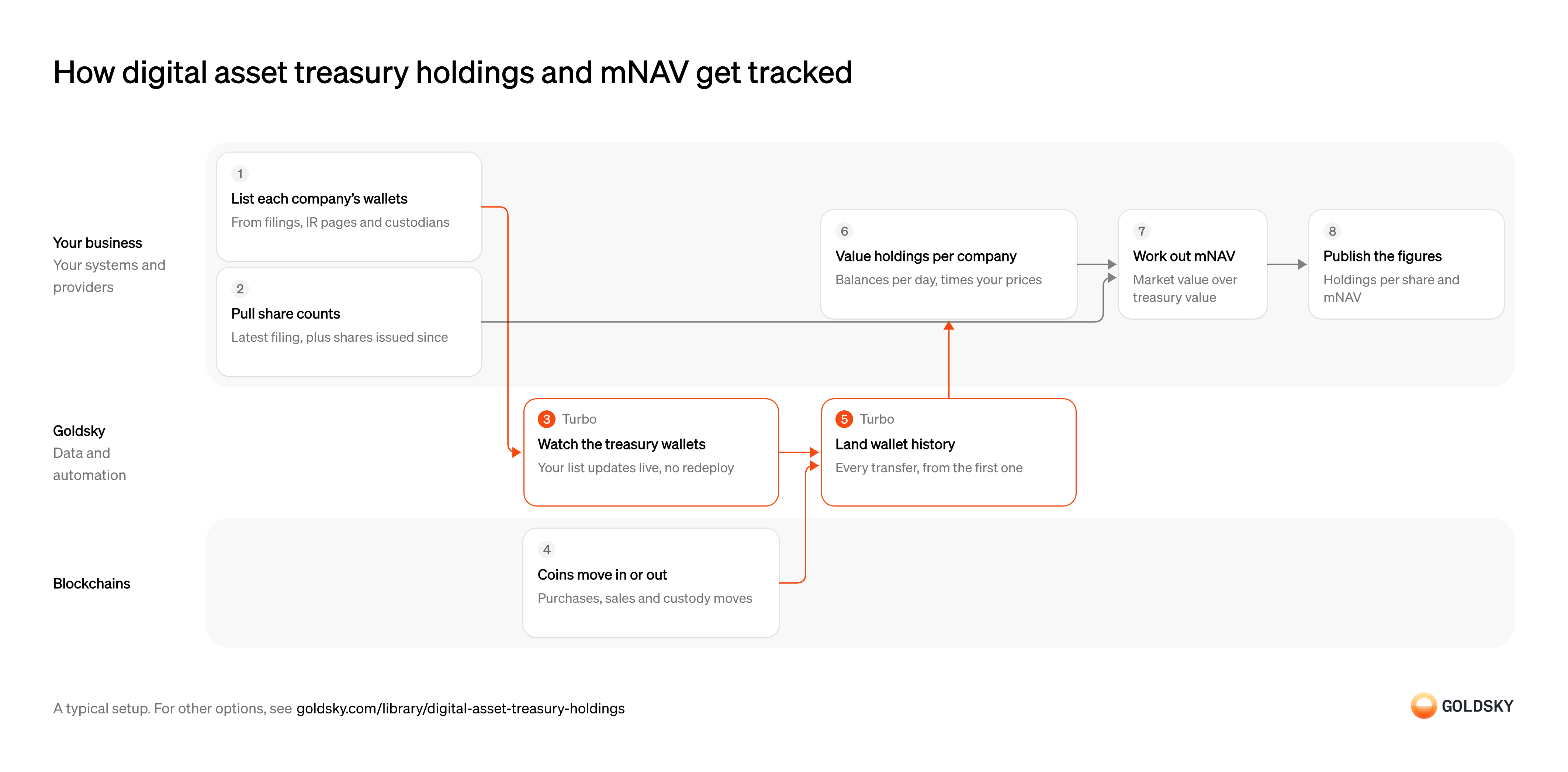
How digital asset treasury holdings and mNAV get tracked
The diagram follows one treasury company from the wallets you list for it to the holdings per share and mNAV you publish. Your setup may differ.
Ways to track digital asset treasury holdings
Streaming builds each wallet’s full history in your warehouse, bitcoin wallets included; the balances API returns what EVM and Solana wallets hold now, priced in dollars, each time you call it.
- Best for
- Many companies across chains, with daily history
- Products
- Turbo
- What you run
- The destination: your database, queue or bucket, or a Postgres database Goldsky hosts
- What you write
- Pipeline YAML and SQL; TypeScript transforms when needed
- Where your data lives
- In your own database or systems
- How results reach you
- Pushed to you
- Best for
- Ether and SOL treasuries, priced today, without a warehouse
- Products
- Feeds
- What you run
- Nothing; you call an endpoint and keep what you need
- What you write
- REST requests
- Where your data lives
- Hosted by Goldsky
- How results reach you
- Returned when you call
| Usual setupOption 1: Stream wallet history | Option 2: Wallet balances API | |
|---|---|---|
| Best for | Many companies across chains, with daily history | Ether and SOL treasuries, priced today, without a warehouse |
| Products | Turbo | Feeds |
| What you run | The destination: your database, queue or bucket, or a Postgres database Goldsky hosts | Nothing; you call an endpoint and keep what you need |
| What you write | Pipeline YAML and SQL; TypeScript transforms when needed | REST requests |
| Where your data lives | In your own database or systems | Hosted by Goldsky |
| How results reach you | Pushed to you | Returned when you call |
List each company’s wallets
Holdings can only be read onchain once you know which wallets belong to each company.
Build the list from filings, investor relations pages, custodian disclosures and wallets the company has verified, and keep the source for each. Analysts who follow spot bitcoin ETFs build the same kind of list from the funds’ custody wallets, which issuers don’t always disclose.
Pull share counts
Holdings per share and mNAV both divide by the number of shares, so you need a current count.
Start from the latest filing and add shares issued since, plus convertible notes and warrants if you count them. That choice decides whether your mNAV is basic or fully diluted, so publish which one you use.
Watch the treasury wallets
Handled by Goldsky TurboOnly movements in and out of the listed wallets count, and the list grows as companies disclose new ones.
A new wallet has to start counting as soon as it’s added, and its earlier transfers have to be loaded too, or the company’s holdings start short.
With Goldsky, the wallet list lives in a Turbo Pipelines dynamic table, which lives in a Postgres database, and
Learn about dynamic tables (opens in a new tab)dynamic_table_check()keeps only transfers to or from those wallets. Add a row and the running pipeline picks it up with no redeploy.Coins move in or out
A treasury’s holdings change when the company buys, sells or moves coins between custodians.
Each of those is a transfer onchain, even when the company reports it only in its next filing. A move between two of the company’s own wallets changes nothing, so it has to net to zero in your totals.
Land each wallet’s full history in your warehouse
Handled by Goldsky TurboHoldings on any past day are the sum of every transfer up to that day, so you need each wallet’s history from its first transfer.
History and new transfers land in the same tables, each with its block time. When the chain replaces recent blocks in a reorg, transfers from those blocks have to be corrected, or holdings include coins that never arrived.
A Turbo Pipelines source can start from the chain’s earliest block, so the pipeline loads past transfers before it follows new ones, and sinks with a
Choose where a pipeline starts (opens in a new tab)primary_keyapply reorg corrections to the same rows. Bitcoin transactions arrive whole, with their inputs and outputs as JSON for your warehouse to parse.Value holdings per company
Coins become a dollar treasury value only once each one is priced.
Your warehouse sums each wallet’s transfers into a balance per day, adds up the company’s wallets and multiplies by your price for that day. Price every company from the same source at the same time, or two companies holding the same coins show different values.
Work out mNAV
mNAV shows how the market prices each company against the crypto it holds.
Divide market value, the share price times your share count, by treasury value. Some analysts use enterprise value instead, which adds debt and preferred stock and subtracts cash, so state the method next to each figure.
Publish holdings per share and mNAV
Investors compare companies on the same figures, day by day.
Publish holdings, holdings per share and mNAV with the date and share count behind each, and link each figure to the wallets and filings it rests on. Governments that hold bitcoin publish the same kind of figure: Texas law requires its comptroller to report the state reserve’s holdings and their estimated value.
What to know about streaming treasury wallet history
- Goldsky runs the pipelines; you own the warehouse tables, the holdings maths and the published figures.
- Bitcoin transactions arrive with their inputs and outputs as JSON, which your warehouse parses to find the wallets.
- Holdings come from the wallets you list, so a wallet a company hasn’t disclosed is missing from its total.
List each company’s wallets
Holdings can only be read onchain once you know which wallets belong to each company.
Build the list from filings, investor relations pages, custodian disclosures and wallets the company has verified, and keep the source for each. A wallet the company hasn’t disclosed stays out of its total.
Pull share counts
Holdings per share and mNAV both divide by the number of shares, so you need a current count.
Start from the latest filing and add shares issued since, plus convertible notes and warrants if you count them. Publish which share count you use.
Read each wallet’s balances
Handled by Goldsky FeedsA company’s holdings are what its wallets hold now, token by token.
Every listed wallet needs a call on each run, and each result needs the time it was read, since balances and prices change between runs.
The Goldsky Feeds Balances endpoint returns the latest balance of each token one EVM or Solana wallet holds, native tokens included, with a USD value per row and a total for the wallet.
Read a wallet’s balances (opens in a new tab)Value holdings per company
The company’s treasury value is the sum of its wallets.
Add up each company’s wallets per token and store the run’s result with its date. Check for tokens that came back without a price before you total, or the treasury value comes out low.
Work out mNAV
mNAV shows how the market prices each company against the crypto it holds.
Divide market value, the share price times your share count, by treasury value. State whether you use market value or enterprise value next to each figure.
Publish holdings per share and mNAV
Investors compare companies on the same figures, day by day.
Publish holdings, holdings per share and mNAV with the time and share count behind each, and link each figure to the wallets and filings it rests on.
What to know about a wallet balances API
- It returns current balances only, so your holdings history is the series you store.
- USD values come with each balance; a token with no recent price comes back without one.
- It covers EVM and Solana wallets, so bitcoin treasuries need the streaming way.
What you control
- Your team
- List each company’s wallets
- Pull share counts
- Value holdings per company
- Work out mNAV
- Publish holdings per share and mNAV
Questions and answers
What is mNAV?
mNAV is a treasury company’s market value divided by the value of the crypto it holds. Above 1, the market values the company at more than its holdings; below 1, at less. Trackers count shares differently, from shares outstanding to fully diluted shares that include convertible notes and warrants, so one company can show several mNAV figures.
How do you calculate mNAV?
Divide the company’s market value by the value of its crypto holdings. Market value is the share price times the share count. Treasury value is the amount of each token held times its price, added up. Some analysts use enterprise value in place of market value, adding debt and preferred stock and subtracting cash.
What is a crypto treasury company?
A crypto treasury company is a public company that holds a cryptocurrency, such as bitcoin, ether or SOL, as its main treasury asset. Investors follow its holdings, its holdings per share and its mNAV to see what each share is backed by and how the market prices it against those holdings.
Security and deployment
- SOC 2 Type IIIndependently audited security controls.
- Dedicated infrastructureSingle-tenant options for production workloads.
- Data residencyCloud, on-premises or co-located.
More use cases that analyze onchain activity
- Stablecoin transaction volume and market share by chainMeasure real stablecoin or tokenized-asset volume by chain, with inorganic flows stripped out.
- Track stablecoin issuers and competitors onchainFollow competitors’ and issuers’ supply, mints, burns and holders.
- Protocol financial statements from chain dataBuild income statements (fees, revenue and costs) for chains and apps from their contracts.
- Onchain research on listed crypto companiesTrack listed companies’ onchain revenue and users before they report earnings.
- Grant and incentive impact trackingMeasure what grants and incentive programs did to users, volume and TVL, per grantee.
- DAO delegate dashboards and voting power analyticsTrack voting power, delegators and votes per delegate for a token-governed DAO.
- Blockchain ecosystem growth metricsTrack a chain’s active, new and returning addresses, transactions, fees and usage per app, compared with other chains.
- Stablecoin market data for analytics: market cap, supply and activityTrack stablecoin supply and market cap by token, chain and issuer, with holders, active addresses, transfer counts and velocity over time.
Use cases built the same way
- Stablecoin disbursements for public-sector programsTrack government benefit or grant payments made in stablecoins, from issue to spend.
- Daily stablecoin supply by chain for PS-01 reportsKeep the daily per-chain supply, issued, redeemed, issuer-held, frozen and lost figures that feed the weekly OCC PS-01 report.
- CFTC digital collateral reporting dataReport totals of BTC, ETH and USDC held as margin, per asset and account class, each week during an FCM’s first three months under the CFTC pilot.
- NCUA stablecoin reporting dataReport supply, mint and burn, and holder figures for a stablecoin issued by a credit union subsidiary under the NCUA’s proposed rules.
Track digital asset treasury holdings and mNAV with Goldsky
We’ll map it to your systems and show you what Goldsky runs, so your team builds the product, not the pipelines underneath it.
 Robinhood
 HyperEVM
 Arc
 Solana
 Ethereum
 Polymarket
 Base
 Tempo
 Bitcoin